Free Advertising Agency Scope of Work Template [Docs / DOCX]
You've seen it happen. A client approves the creative brief for their Q2 campaign. Your team develops three solid concepts. The client picks one. Then, two weeks before launch, their CMO decides they need to test a completely different angle, which means your designers and copywriters are back to square one, unpaid.
This happened because you didn't define the project scope at the beginning of the project. In this article, I'll guide you on how to write a scope of work that defines your responsibility to the project.
What is an Advertising Agency Scope of Work?
An advertising scope of work (SOW) is the document that defines the details of the project, including the campaigns you'll run, the channels you’ll buy media in, and the creative assets you're producing.
Unlike a generic project brief, it’s specific to advertising work. It specifies:
- Which advertising channels you're managing (paid search, social, display, programmatic, traditional).
- How many creative concepts and variations you'll produce.
- What your media buying responsibilities include (and what they don't).
- When campaigns launch and when performance reviews happen.
- Who approves creative, media plans, and budget changes.
Other Reasons Why You Need an Advertising Agency Scope of Work
A scope of work protects advertising agencies in three specific ways:
1. Control Creative Iteration Costs
Creative work is where scope creep lives. A client sees the first concept and suddenly wants to explore a different direction. Then another, and another. Then they want to combine elements from all three concepts into a fourth version.
Without a scope of work, you'll produce so many creative rounds on a fixed fee.
With one, you can specify:
three initial concepts, two rounds of revisions per chosen concept. Anything beyond that is billed at your standard hourly rate.
The client can still ask for more, only this time, they know it costs more.
2. Define Channel Boundaries
Advertising campaigns often start in one channel and clients expect them to expand into others. You're running Google Ads, then the client asks about Microsoft Ads. You're managing Facebook campaigns, then they want Instagram, then LinkedIn, then TikTok.
SOW document helps you avoid this by listing the platforms you’ll manage. Google Ads and Facebook only. Not LinkedIn. Not YouTube pre-roll.
When your clients ask about additional channels, you can refer back to the scope and discuss a separate task, or that you’d make amendments with appropriate pricing.
If you want to bill them for a separate service, you can use the ManyRequests add-on feature that keeps the separate request as a part of the project but billed differently.
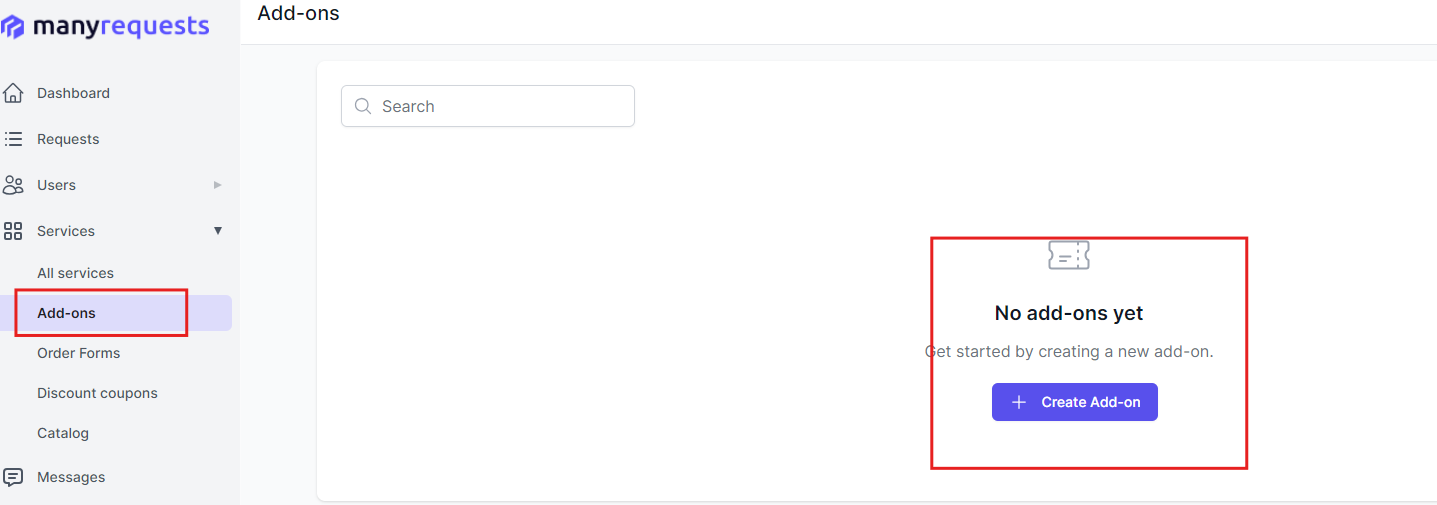
This way, they can easily book for additional services, and you can avoid scope creep.
3. Separate Media Strategy from Media Execution
Your clients may confuse recommending a media mix with committing to execute it.
You might suggest testing connected TV in your quarterly strategy presentation, but that doesn't mean you're set up to buy and manage CTV campaigns.
Your scope of work clarifies what you're actually doing versus what you're recommending. It specifies which channels you're actively buying and managing, which platforms you have expertise in, and what execution actually looks like.
Creating Your Advertising Agency Scope of Work
This is a six-step process, (but you can use our template to get started right away):
1. List of Services and Tasks
Write every service you’ll provide, and be precise about what each one includes. The goal is to remove guesswork for you and the client.
For example, for paid search, write that you’ll define:
- The campaign structure (how many campaigns and ad groups)
- Keyword research limits (e.g., up to 50 keywords)
- The number of ad variations (e.g., five responsive search ads per ad group)
- Your role in landing page optimisation (will you only recommend changes, or actively make them?).
You can apply the same clarity to every channel:
- How many platforms you’ll run ads on (e.g., Google and Meta only).
- How many creatives you’ll produce per campaign (e.g., 6 static images, 2 banners, 1 video).
- Which banner sizes you’ll design (e.g., 300×250, 728×90).
- How often you’ll report (e.g., monthly performance report).
You should also list what you won’t do under each service.
Being this specific helps you price accurately and prevents scope creep later.
2. Project Timeline and Milestones
Show when each phase starts, when deliverable is due and when clients should expect results.
For a campaign launch, you’ll outline something like:
- Week 1: Kickoff call, access to accounts, campaign brief.
- Week 2: Audience research, media plan, creative concepts.
- Week 3: Asset production and campaign setup.
- Week 4: Launch and first round of optimisation.
For retainers, define recurring deadlines so nothing feels random:
- Performance reports sent by the 5th business day of each month.
- Strategy calls on the second Tuesday of every month.
- New creative concepts every two weeks.
If a campaign runs in phases (awareness — consideration — conversion), state when each phase begins and ends, and what success looks like in each stage.
3. Deliverables and KPIs
List exactly what the client will receive, and how success will be measured.
Your deliverables might include:
- A media plan showing channels and budget split
- All creative assets in the agreed formats (ad copy docs, JPG/PNG banners, MP4 videos)
- Full campaign setup across the chosen platforms
- Performance reports delivered in a set format (e.g., PDF via email or client portal)
- A quarterly strategy review deck
For performance, define success using clear, realistic KPIs:
- Cost per acquisition under a set target (e.g., $45)
- Return on ad spend above a benchmark (e.g., 3:1)
- Minimum click-through rates by channel
- Conversion rate improvement over their current baseline
These numbers create a shared definition of success. Everyone knows what you’re working toward and how you’ll judge progress.
4. Out of Scope Items
These are tasks and activities you won't be providing.
For example, you might specify that your service does not include:
- Custom video production or editing
- Landing page design or development
- Email marketing campaigns
- Influencer outreach or partnerships
- Traditional media buying (TV, radio, print, outdoor)
- Brand strategy or repositioning work
You can also clarify that:
- Ad spend and platform fees are paid directly by the client
- Any new channels outside the agreement (e.g., TikTok, Pinterest) require a new scope
When these requests come up later, you can refer back to this section and offer them as add-ons with separate pricing. This keeps your core agreement clean and helps you prevent silent scope expansion.
5. Revision Policy
You need some flexibility for revisions, so specify what's included and what costs extra.
- For creative concepts, you might include two rounds of revisions per concept.
- For ad copy, maybe three rounds of revisions per campaign are included.
- For media plans, perhaps one round of strategic revisions is included before campaign launch.
After that, you can bill any additional review separately.
You’ll also set the working rhythm:
- Clients must send consolidated feedback within three business days
- Revisions are completed within three business days of receiving feedback
- All feedback comes from one designated contact
6. Approval and Point of Contact
Define who approves what and how feedback gets submitted. Identify the primary contact for day-to-day campaign decisions and creative feedback.
Name the final approver for budget decisions and strategic direction, (this is usually someone more senior). And if there's a technical contact for platform access and tracking implementation, list them too. You should also list the deliverables that will need approval before you can proceed with the next task.
How To Use Our Advertising Agency Scope Statement Template
Customize and use the template with these simple steps:
- Download the template from our website.
- Edit the text to add your business name and logo.
- Fill in all highlighted spaces and italicized words with your information .
- Add the specific services you'll offer your client.
- Review it with your team members.
Conclusion
An advertising agency scope of work protects your agency from scope creep and helps you manage client expectations. You can use this template to specify the campaigns you'll execute and when, and always refer to it throughout the project to avoid clients piling work on your team.
And if you want to further improve your agency's structure, use ManyRequests to access features like client portal, project management, time-tracking, and automated invoicing in one platform. This way, you can manage scope creep, deliver work, and get paid without integrating another accounting software. Give it a shot for 14 days, free of charge.

.svg)