Free LinkedIn Ads Scope of Work Template [Docs / DOCX]
What could go wrong with Linkedin ads?
I’ll paint a scenario:
Your client's LinkedIn Ads account got suspended mid-campaign because their landing page violated LinkedIn's lead gen policies.
They've sent you a long email blaming you even though you flagged the compliance issue twice in writing.
It's not your fault. But the client doesn't know that, because you didn't draft a scope that defines your responsibility and their responsibility before you started the project.
In this article, I'll show you how to write a scope of work for the LinkedIn Ads project you just got, and I'll share a ready made template that you can edit and send to your client.
What is a LinkedIn Ads Scope of Work?
A LinkedIn Ads scope of work defines your campaign management services, ad spend responsibilities, performance benchmarks, and reporting frequency.
It clarifies whether you're managing the entire funnel (ad creation, landing pages, lead nurturing) or just the ads platform.
It also shows how many campaigns you'll run, how often you'll optimize, and what results are realistic based on your client’s budget and industry.
Why LinkedIn Ads Projects Need a Scope of Work Statement.
These are three reasons why you should download our template, and send your client a scope of work document:
1. Budget Responsibility Gets Murky Fast
Let's say your client approves a $10,000 monthly ad spend. Week three hits and LinkedIn's auction dynamics shift (your target CPCs jump from $8 to $14 (maybe) because three competitors launched campaigns targeting the same audience).
You can either pause campaigns which would make you lose momentum or increase spend to stay competitive, so you increase bids to maintain delivery, and your month-end invoice shows that you spent $13,200.
The client says they won't pay, because you’ve gone over the budget, which is true. Because you didn't tell them otherwise, but you can state this in your scope of work before the project starts.
Your scope of work defines budget authority.
For instance, you can include this in your scope:
"Monthly ad spend budget: $10,000. The agency has authority to exceed budget by up to 30% ($3,000) to maintain campaign performance during auction fluctuations. Overages beyond 30% require written client approval before implementation. Clients will be notified within 24 hours of any budget adjustments."
This way, when auction costs spike, you have documented authority to make necessary adjustments.
2. Campaign Objectives Change Without Scope Adjustments
LinkedIn advertising works when campaigns are built around a clearly defined objective. Lead generation, brand awareness, engagement, and conversions may share the same platform, but they depend on different campaign structures and creative formats.
Linkedin optimizes these objectives differently, which means you can't interchange the expectations and economics behind them.
A well-defined scope of work fixes the campaign objective from the outset and states how you’ll measure success. If your clients want to shift objectives later, you can refer back to the scope of work.
ManyRequests (a project management tool) helps you keep it all on record), including what you've discussed at the beginning of the project.
If your client wants a different objective besides what's been earlier discussed, they can add more services to the project with ManyRequests’ add-on feature.
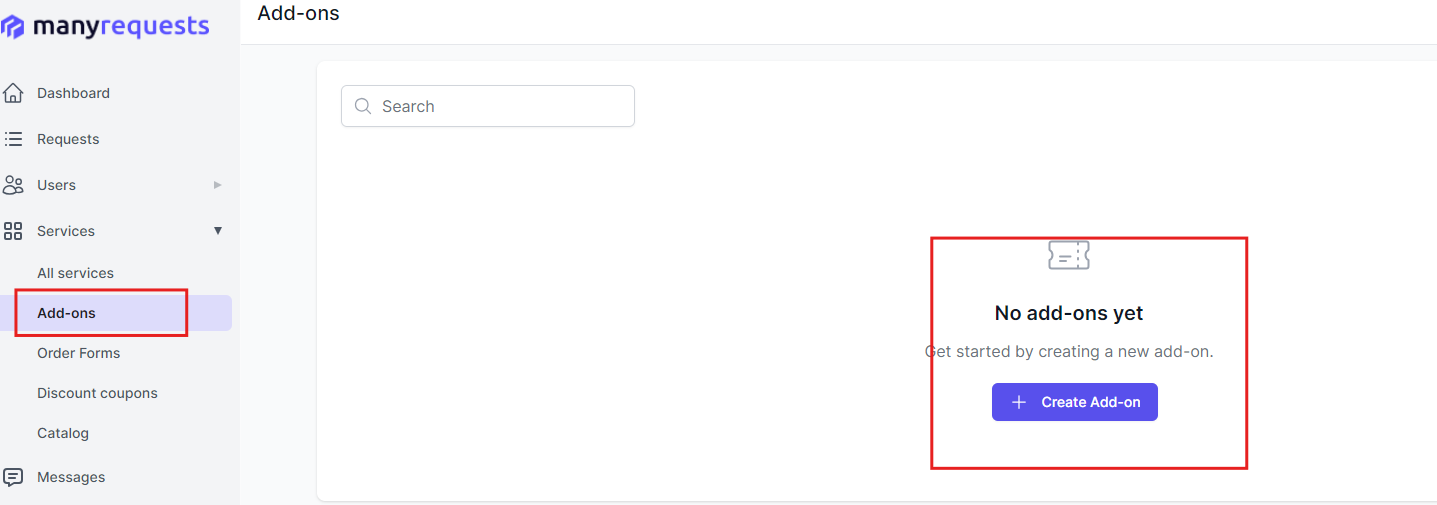
You can bill them separately for extra shifts outside your scope of work.
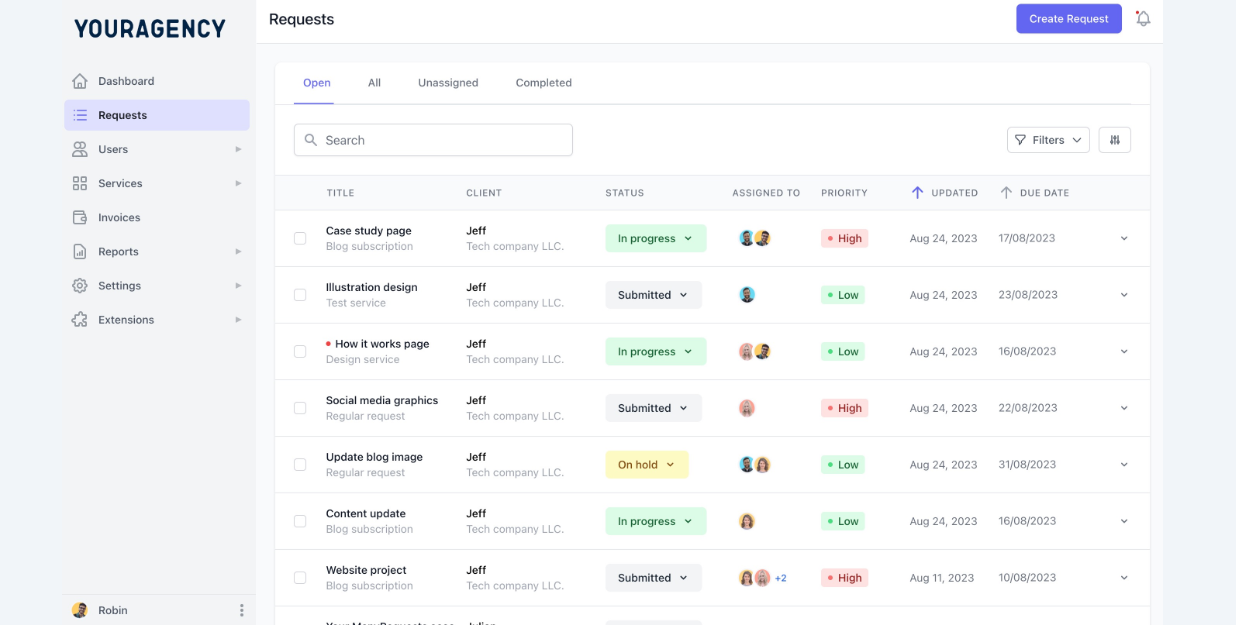
You can also easily track who requested the service, when they did, and which of your team members is working on it from a centralized dashboard.
3. Creative Approval Bottlenecks Kill Campaign Momentum.
If you don't follow a documented approval process, your client will most likely delay feedback.
You’d submit your progress reports, but they wouldn't send feedback back ASAP. This means you’d need to wait, get approvals late, and you may miss optimal launch windows like the start of a sales quarter.
A scope of work adds specific timelines and rules that enforce accountability.
For example, you can add that:
- The agency delivers policy-compliant creatives (Sponsored Content, etc.) 5 business days early.
- Client feedback due in 2 business days—consolidated only.
- 2 major revisions free monthly; extras $500.
- The agency can launch its version and queue for LinkedIn’s 24-hour review if the client misses the deadline.
Creating Your LinkedIn Ads Scope of Work
These are 8 steps to create your LinkedIn Ads scope of work:
1. Campaign Objectives and Strategy
Start by defining what you're optimizing for and the overall campaign strategy.
LinkedIn offers multiple campaign objectives (brand awareness, website visits, engagement, lead generation, conversions) and each of them needs different targeting and bidding approaches.
A scope of work (SOW) locks this in upfront so clients can't pivot mid-campaign without scope adjustments.
Here's an example of what that looks like:
Campaign Objective: Lead generation / Brand awareness / Website conversions / Engagement
Target Audience:
- Job titles: (C-suite, Marketing Directors, Sales Managers, etc.)
- Industries: (SaaS, Financial Services, Healthcare, Manufacturing, etc.)
- Company size: (1-50, 51-200, 201-500, 501-1000, 1000+ employees)
- Geographic targeting: (United States, EMEA, APAC, specific cities/states)
- Seniority levels: (Entry, Manager, Director, VP, C-Level)
Campaign Strategy:
- Funnel stage focus: (Top of funnel awareness / Middle funnel consideration / Bottom funnel conversion)
- Number of campaigns: (3 active campaigns per month)
- Ad formats: (Sponsored Content, Message Ads, Dynamic Ads, Text Ads)
2. Include the Ad Creative Services You’ll Provide.
Define who creates the ad creative and how many variations you'll produce.
This section clarifies whether you're designing ads or the client is providing assets, so be specific about creative formats, file requirements, and revision limits.
For instance, state what your agency provides:
Agency Provides:
- Ad copywriting: (3 variations per campaign for A/B testing)
- Image sourcing: (Stock images from agency library)
- Video editing: (Up to 30-second videos from client-provided footage)
- Ad design: (Static image ads in LinkedIn specs: 1200x627px)
- Creative testing strategy: (A/B test headlines, images, CTAs)
And what the client provides:
Client Provides:
- Brand assets: (Logo, brand guidelines, approved imagery)
- Product/service information: (Value propositions, key messaging, differentiators)
- Case studies or testimonials: (For social proof in ad copy)
- Video footage: (If video ads are required and not included in agency services)
And what's not included:
NOT Included:
- Custom video production from scratch
- Professional photography shoots
- Animated graphics or motion graphics
- Landing page design or development
3. Add Campaign Management and Optimization Capacity.
Outline the hands-on work you'll do to manage campaigns daily, weekly, and monthly. This shows clients you're actively optimizing, not just setting campaigns live and forgetting them.
Detail your optimization frequency, bid adjustments, audience refinements, and performance monitoring.
You’ll see this in the template.
4. Include Ad Spend Budget and Authority
Clearly define the monthly ad spend budget and your authority to make adjustments.
LinkedIn's auction pricing fluctuates based on competition, and you need flexibility to optimize without waiting for approval.
Set boundaries for when you can adjust budgets independently versus when you need written approval.
It looks like this:
Monthly Ad Spend Budget: $______
Agency Budget Authority:
- Can increase daily budgets by up to 15% to capitalize on high-performing campaigns
- Can decrease budgets by up to 20% to pause underperforming campaigns
- Can reallocate budget between campaigns without client approval
- Must get written approval for total monthly spend increases exceeding 15%
Budget Notifications:
- Client notified within 24 hours of budget adjustments
- Weekly budget pacing reports showing projected month-end spend
- Alert sent if spend pace indicates 10%+ overage or underspend
Ad Spend Invoicing:
- Client billed directly by LinkedIn (client's credit card on file)
- OR Agency pays LinkedIn and invoices client monthly with 5% processing fee
- Payment due within 10 days of invoice to avoid campaign pauses
5. State Performance Benchmarks and KPIs
Set realistic performance expectations based on industry standards and the client's budget.
LinkedIn Ads have higher CPCs than other platforms because you're targeting decision-makers and executives. An SOW documents what success looks like and what metrics you're tracking so clients don't expect Facebook-level costs.
6. Reporting Frequency and Format
Define how often you'll report performance and what data you'll include. Monthly reports are standard, but some clients want weekly updates during campaign launches.
Be specific about report format, metrics included, and turnaround time for delivering reports.
7. Clarify Landing Page and Conversion Tracking
Clarify who handles landing pages, conversion tracking setup, and lead nurturing.
Many clients assume you're managing the entire funnel when you're only managing the ads. Define where your responsibility ends and what technical setup is required from the client's side.
8. LinkedIn Account Access and Compliance
Define account ownership, access levels, and who's responsible for LinkedIn policy compliance.
Account suspensions due to policy violations can pause campaigns for weeks, so clarify who handles compliance monitoring and what happens if the account gets flagged.
For example:
Compliance Responsibilities:
- Client ensures landing pages comply with LinkedIn's Advertising Policies
- Agency reviews ad creative for policy compliance before launch
- Client responsible for any account suspensions due to landing page violations
- Agency will notify client within 24 hours of policy violation warnings
What Happens if Account is Suspended:
- Agency pauses work until account is reinstated
- Client handles appeals and compliance issues with LinkedIn support
- Agency provides documentation of compliant ad creative for appeals
- Monthly retainer continues during suspension (agency available for support)
How to Use our LinkedIn Ads Scope of Work Template
Here's how to customize our free Linkedin Ads scope statement template to fit your agency's needs:
- Download the template from our website.
- Edit the text to add your business name and logo.
- Fill in all highlighted spaces and italicized words with your information
- Add the specific services you'll offer your client
- Review it with your team members
Conclusion
A proper scope of work spells out who owns compliance, how much budget you can adjust, what success looks like between you and your clients. But it doesn't stop at signing a scope of work; you still need to execute the project. ManyRequests keeps the scope, approvals, add-ons, and client requests in one place, so you have a bird’s-eye view of every client and project you're handling. Sign up for a 14-days free trial to see how ManyRequests works.
.svg)